
The new Microsoft Planner pulls your tasks, plans, and projects into one workspace—right in Teams or the web—so your business can plan, track, and collaborate with less juggling.
Calendars, task lists, and project tools are core to running a business. Many companies use Microsoft apps for this—Planner, To Do, and Project for the web. The challenge has been moving between separate apps to get simple work done.
All that switching adds up. One study found the average worker toggles among 22 apps roughly 350 times a day. That’s a lot of lost focus.
To cut the clutter, Microsoft began rolling out a redesigned Microsoft Planner in early 2024. It blends planning, tasks, scheduling, and AI guidance into one experience.
What the new Microsoft Planner Brings Together
The updated Planner combines familiar pieces into a single place:
- The teamwork capabilities you know from Planner
- Simple, clear task tracking from Microsoft To Do
- Scheduling and project tools from Project for the web
- AI assistance from Microsoft Copilot (Microsoft’s built-in AI)
Use it inside Microsoft Teams or in your browser. Either way, you’ll manage day-to-day tasks and larger projects without hopping between apps.
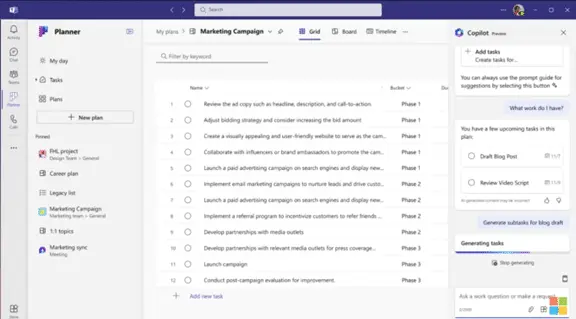
One Place for Tasks, Plans, and Projects
Instead of bouncing from a to-do app to a project board to a calendar, you can keep everything connected. Handle quick action items and multi-phase projects in the same, clean interface. That’s handy for offices around Panama City where teams split time between the office and the field.
Work Together Without the Back-and-Forth
Real-time updates help everyone stay aligned. Teammates can co-own tasks, add comments, and see changes as they happen. It’s easier to know who’s doing what and when it’s due—without chasing status in chat or email.
Copilot Helps You Stay on Track
Planner includes Microsoft Copilot to lighten the load. It can recommend plans, tasks, and objectives that fit your current work. Copilot can also review progress and suggest next steps to keep things moving.
From Simple Checklists to Company-Wide Efforts
Whether you’re tracking a short list for yourself or coordinating a complex rollout across departments, Planner scales with you. Use it for everything from personal reminders to large initiatives—no need to change tools as your needs grow.
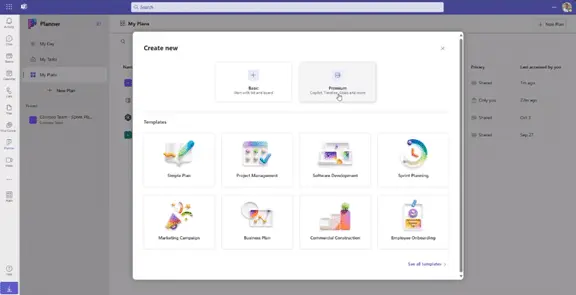
Start Fast with Ready-Made Templates
Don’t build from scratch unless you want to. Planner offers templates you can tailor, so you can get moving quickly on the kind of work you do most often. Examples include:
- General project planning
- Building and shipping software
- Agile sprint planning
- Running a marketing campaign
- Commercial building projects
- Bringing new employees onboard
- Plus other common scenarios
Highlights You’ll Notice Day One
- Easier navigation: A refreshed layout helps you find plans, views, and details faster.
- Flexible views: Choose how you look at work—board, grid, and other views let you organize tasks the way your team thinks.
- Works with Microsoft 365: Connects with Teams, Power BI, Viva Goals, Power Automate, and others to tie plans into your daily tools.
- Your data, your way: Add custom fields to capture the details that matter to your projects.
- Goals you can see: Set objectives and track visual progress inside your plans.
- Spot the critical path: Identify the must-do tasks that drive your finish date.
- Quicker search: Powerful search helps you pull up the right plan, task, or file without digging.
When You Can Use It
The new Planner entered preview in early 2024, with broader availability following and some capabilities arriving later in the year. You can check Microsoft’s update page for the roadmap and sign-ups.
Why This Direction Matters
The trend is clear: fewer apps, simpler views, and smarter help. By unifying planning in one place and adding AI, Planner reduces busywork and keeps teams focused on outcomes instead of tools.
Help Rolling Out the Right Tools for Your Business
Mixing older systems with new cloud apps can get messy—features get missed and security gaps appear. If you want guidance choosing, setting up, and securing tools like Planner and Teams, our managed IT provider team can help you put the pieces together and show staff how to use them well.
Sources and further reading
- Microsoft Planner overview
- Microsoft Tech Community: The new Microsoft Planner
- Harvard Business Review: How much time we waste toggling between apps
Have questions about rolling out Planner and Teams for your staff in Bay County? Let’s talk through options that fit your workflow—get in touch.