
Looking for the new Microsoft Edge features that matter for business? Highlights include project-based Workspaces and a built-in VPN, plus several handy tools that make everyday browsing faster and safer for your team in Bay County.
Edge keeps evolving, and it shows. While Chrome still leads, Microsoft’s browser now ranks third globally, just behind Safari—overtaking Firefox along the way (source).
What’s new isn’t just cosmetic. Edge now packs tools that help your staff stay organized and protect company data—right in the browser.
Get More Done With Workspaces
Think of Workspaces as a tidy desk for each project. You group the tabs, sites, and files you need into their own space, so you’re not digging through a sea of unrelated tabs. It’s a simple way to keep sales, operations, or that vendor rollout neatly separated—great for busy offices around Panama City.
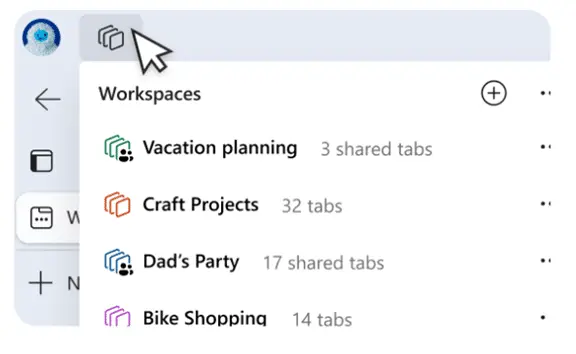
- Make it yours: Name each Workspace and pick a color so you can spot projects at a glance.
- Jump between projects fast: Switch Workspaces with one click to load the right set of tabs instantly.
- Your setup sticks: Close Edge and come back later—your Workspace is preserved, ready where you left off.
- Less clutter, more focus: Keeping only what’s relevant on screen helps reduce distractions.
Browse Safer With Edge Secure Network (Built-In VPN)
Edge now includes a privacy and security boost called Edge Secure Network—a built-in VPN service. It encrypts your connection to help shield data from snooping, which is especially important on public Wi‑Fi. Microsoft provides 5GB of VPN data each month, included in Edge.
- More privacy on the go: The VPN masks your IP address, making it harder for bad actors to follow your activity—handy in airports, hotels, and cafes.
- Protected connection: Encryption helps keep information moving between your computer and the internet from being intercepted.
- Local results without oversharing: Your exact location is hidden, but sites still see a general area near you. You can’t choose a different region for routing.
- 5GB per month included: Edge won’t route major streaming sites (like Netflix, Hulu, Disney+) through the VPN to help conserve that limit.
More New Microsoft Edge Features To Try
- Autofill that saves time: Edge can suggest names, emails, and addresses as you type, so forms go faster.
- Web Capture for quick snapshots: Grab part of a page or the whole thing and paste it into your notes or documents.
- Copilot at your fingertips: Use the Copilot icon for AI help—draft an email, brainstorm, or generate images without leaving your browser.
- Read Aloud for multitasking: Step away from the screen and let Edge read the page to you.
Get Help Exploring Your Microsoft Services
Edge has grown into a practical choice for productivity and privacy-minded teams. If you want to get more from Microsoft—whether that’s these Edge updates or the tools in Microsoft 365—our team can help you explore what fits your workflows.
Have questions or want a hand rolling this out across your staff’s computers and devices? Let’s talk—get in touch.