Yes—you can accept payments in Microsoft Teams. Add the Teams Payments app, link Stripe, PayPal, or GoDaddy, send a request in the meeting chat, and get paid on the spot. It’s available in the U.S. and Canada and included with Teams Essentials and Microsoft 365 Business.
If you meet clients online, jumping between a meeting and a payment site slows everyone down. Microsoft’s Teams Payments app brings the payment step into the same place you already talk and work. For many small businesses around Panama City, that’s one less tool to manage.
The Payments app works inside Teams meetings so you can request and receive money without leaving the call. For now, Microsoft offers it only in the U.S. and Canada, and it’s included at no extra cost with Teams Essentials and Microsoft 365 Business (source).
What the Teams Payments App Does
Install the app from the Microsoft AppStore, add it to Teams, then connect it to one of these payment services:
- Stripe
- PayPal
- GoDaddy
Once connected, you can ask for payment during a meeting and track the status in real time.
How to Accept Payments in Microsoft Teams Meetings
When you’re in a meeting, open the chat. Choose the Payments icon from the messaging extensions, then complete the short form with the amount, currency, description, and who should receive it.
Need more than one person to pay? You can issue a single request to multiple attendees, and each person’s status will show on the same payment card—paid or still due.

Image credit: Microsoft
Your customer will see the same card in the chat. They click Pay Now, get redirected to the provider you connected (Stripe, PayPal, or GoDaddy), enter their details, and confirm.
They’ll get a confirmation message in chat when the payment goes through, and you’ll see a notification on your end.
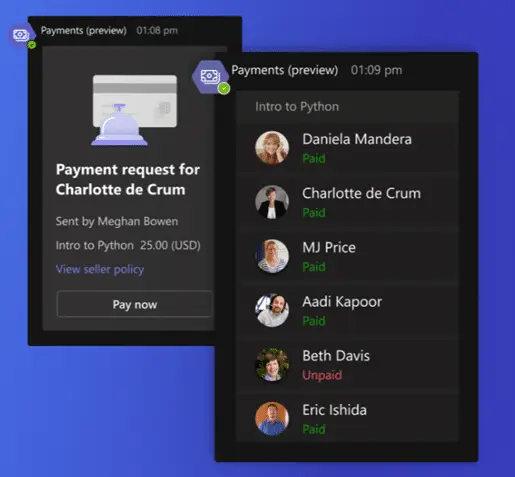
Image credit: Microsoft
Why Businesses Like It
- Less switching, less friction. Stay in one place. Request and collect payment without leaving the meeting, which is faster for you and easier for clients.
- Happier clients. Customers don’t have to sign up for a new account or install another app. A couple of clicks in the chat, and they’re done.
- Faster cash in the door. Get paid right after the service is delivered—often within minutes—into your connected bank account or PayPal account.
- Polished and professional. Use a trusted Microsoft-built experience and include a seller policy with your terms, cancellations, and refund details right on the request.
- Clear records and alerts. Track payments as they happen and receive instant confirmations so your team always knows what’s been paid.
- Works with Microsoft 365. Keep your communication, collaboration, and collection all under one roof—no extra logins or complicated setup.
- More time for real work. Cutting out payment busywork means more focus on serving customers and growing the business.
Frequently asked questions
Where is the Teams Payments app available?
Microsoft is rolling it out in the United States and Canada at this time (source).
Which payment services can I connect?
You can link Stripe, PayPal, or GoDaddy.
Do my customers need to install anything?
No. They can pay from the meeting chat without creating a new account or downloading an app.
Is there an extra fee for the app?
If you use Teams Essentials or Microsoft 365 Business, the Payments app is included at no additional charge (source). Payment processor fees still apply.
Can I include my terms and refund policy?
Yes. Add a seller policy to your request so clients can see your terms, cancellations, and refunds before they pay.
Sources and further reading
Make More of Microsoft 365
The Teams Payments app is a simple way to streamline how you bill and get paid, lift customer satisfaction, and improve cash flow—all inside the tools you already use.
Want help setting this up or making better use of Microsoft 365 across your offices in Bay County? Let’s talk—get in touch.