
Microsoft Security Copilot is an AI assistant for cybersecurity that helps teams spot issues faster, investigate, and respond using plain‑English prompts; it’s a strong option if you use Microsoft’s security stack, but you should weigh tool fit, resources, and training before you roll it out.
Keeping ahead of new threats is hard work for any small business. There’s more data to sort through, more alerts to check, and less time to react. That’s why Microsoft built Microsoft Security Copilot, a generative AI tool that works with your Microsoft security products and answers questions in everyday language.
Below, we explain what it does, how it works, and the pros and considerations so you can decide if it fits your organization here in Bay County.
What Is Microsoft Security Copilot in Plain English?
Think of Security Copilot as a smart helper for your security team. It uses AI and machine learning to analyze signals at high speed, highlight real risks, and guide you through response steps. The goal is to make security operations faster and more effective.
It can support end‑to‑end security work such as:
- Incident response
- Threat hunting
- Intelligence gathering
- Security posture management
- Executive‑level summaries of investigations
How You Use It Day to Day
You can use Security Copilot as a standalone experience, and you’ll also see Copilot features embedded inside other Microsoft security tools.
It connects with:
- Microsoft Sentinel
- Microsoft Defender XDR
- Microsoft Intune
- Microsoft Defender Threat Intelligence
- Microsoft Entra
- Microsoft Purview
- Microsoft Defender External Attack Surface Management
- Microsoft Defender for Cloud
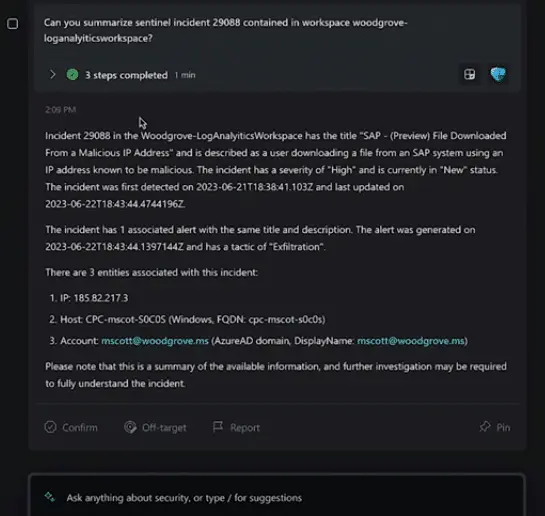
The best part for many teams: you can type questions in natural language and get tailored guidance. For example, you might ask it to:
- List best practices for securing Azure workloads
- Explain how CVE‑2024‑23905 could affect your environment
- Create a summary of the latest attack campaign
- Walk through remediation steps for an incident involving TrickBot malware
Should Your Business Use Microsoft Security Copilot?
Upsides to consider
- Stronger threat detection
Advanced analytics can surface issues traditional tools might miss and adapt as new threats appear, improving your overall security posture. - Greater efficiency
Automated analysis reduces manual grunt work so your team can focus on decisions and action, speeding up response. - Deep Microsoft integration
It plugs into the Microsoft security ecosystem, improving visibility and coordination across tools you may already use. - Always learning
Its AI models learn from fresh data, getting better at spotting and reducing new risks over time. - Fewer false alarms
More accurate detections can cut down on noise, helping teams spend time on real threats.
Things to weigh first
- Fit with your current stack
It integrates smoothly with Microsoft and many other tools, but if you rely on a wide mix of vendors, plan for possible integration work. - Infrastructure needs
AI‑driven capabilities may require additional resources. Confirm your environment can support deployment and ongoing use. - Training and adoption
Teams get more value once they learn the features and workflows. Set aside time for training and practice.
The Bottom Line on What Is Microsoft Security Copilot
Security Copilot is a meaningful step forward for AI‑assisted defense. If your business leans on Microsoft security tools, it can help you move faster and stay organized during investigations. The decision to adopt should come down to tool fit, available resources, and your willingness to invest in team training.
Need Help Getting More from Microsoft?
Microsoft’s ecosystem is broad, and Security Copilot is the latest piece aimed at strengthening protection. If you want help putting these tools to work for your business around Panama City, our managed IT team can guide you.
Have questions or want to talk through options? Feel free to get in touch.