Microsoft Productivity Score helps you see how your team uses Microsoft 365 and where your computers and devices might be slowing work—at a group level, not person-by-person—so you can remove roadblocks and boost productivity.
Tracking productivity is tough, especially with people working in different places. Timecards don’t tell you if tools are being used well or if something is getting in the way. What matters is the work produced—and whether technology and habits are helping or holding your team back.
You don’t want to watch every click. That hurts trust and rarely improves results. If your business runs on Microsoft 365, there’s a better way: Microsoft Productivity Score.
What Is Microsoft Productivity Score?
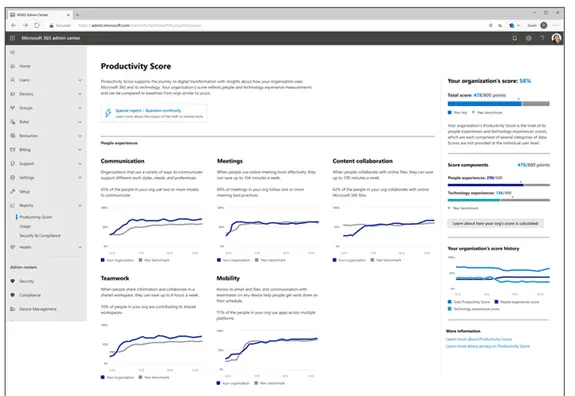
It’s a dashboard that looks at how your organization works in Microsoft 365 and how well your tech is performing. It reports at the organization level, not by individual, which helps you learn and improve without making people feel monitored.
The score delivers insights you can share with your team and includes device and app health data. That combination helps you see both work habits and technology issues that affect day-to-day performance—useful for offices around Panama City and across Bay County.
How Your Team Works: People Experiences
This view highlights work habits that impact collaboration and time savings. Are meetings dragging on? Are people still emailing file attachments instead of sharing links from the cloud? Are teams using tools in ways that speed responses?
For example, Microsoft notes that collaborating in online files can save an average of 100 minutes per week. Over a year, that’s about 86.6 hours—more than two full workweeks.
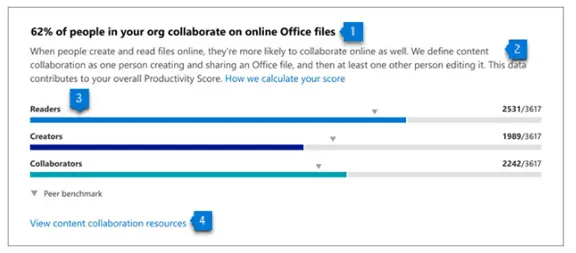
People experiences include:
- Communication
- Content collaboration
- Mobility
- Meetings
- Teamwork
How Your Tech Performs: Technology Experiences
This area focuses on device and app health. Are outdated apps, slow machines, or poor connections getting in the way? Are updates current and security concerns addressed? When technology struggles, productivity drops.
Technology experiences cover:
- Endpoint analytics (requires Intune)
- Network connectivity
- Microsoft 365 apps health
Change Tracking: Special Reports
Special reports show how collaboration and other activities shift during business changes—such as moving to remote work or returning to the office. This view helps you understand how transitions affect productivity and business continuity.
How Microsoft Productivity Score Helps Your Business
Automatic metrics that show real usage
The score automatically tracks how your organization uses Microsoft 365 and surfaces useful patterns. You can quickly see if teams follow time-saving practices or if they’d benefit from a little guidance.
Insights that explain what the numbers mean
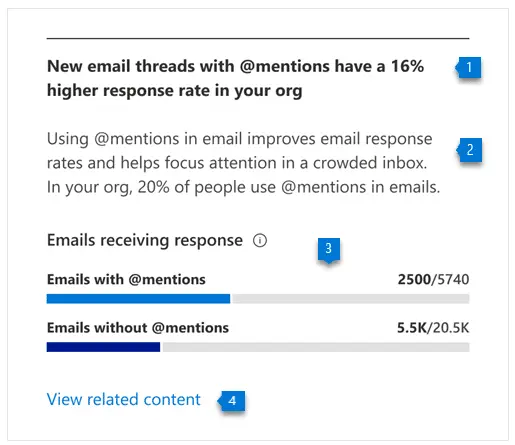
Numbers alone aren’t enough. The dashboard adds context so you can understand the why behind each metric and coach your team on smarter ways of working. For instance, tagging coworkers with @mentions can speed up replies. Productivity Score shows how many people use @mentions in team tools—and how much this improves response rates.
Clear next steps you can act on
You also get recommended actions to improve specific metrics. That way, you’re not guessing—you have practical steps to raise your score and streamline work.
Together, the metrics, insights, and recommended actions make this a well-rounded tool for continuous improvement.
Frequently asked questions
Does Productivity Score monitor individual employees?
No. It reports at an aggregate (organization) level, so you can learn what’s working without tracking personal activity.
Do we need extra tools for device analytics?
Endpoint analytics in Technology Experiences requires Intune. Network connectivity and Microsoft 365 apps health are also part of the technology view.
How do we get started?
If your company uses Microsoft 365, you can turn on the Productivity Score dashboard and begin reviewing the people and technology insights it provides.
Get Started with Productivity Score
Want help turning these insights into real improvements? We can set up the dashboard and help your team adopt the practices that save time and reduce friction.
Have questions or want hands-on help? Let’s talk—get in touch.